
Pi: there are many coding harnesses, but this one is mine
My experience with Pi as a minimal, pluggable coding harness for agent work in the terminal, without forcing someone else's workflow on me.
Published · June 4, 2026
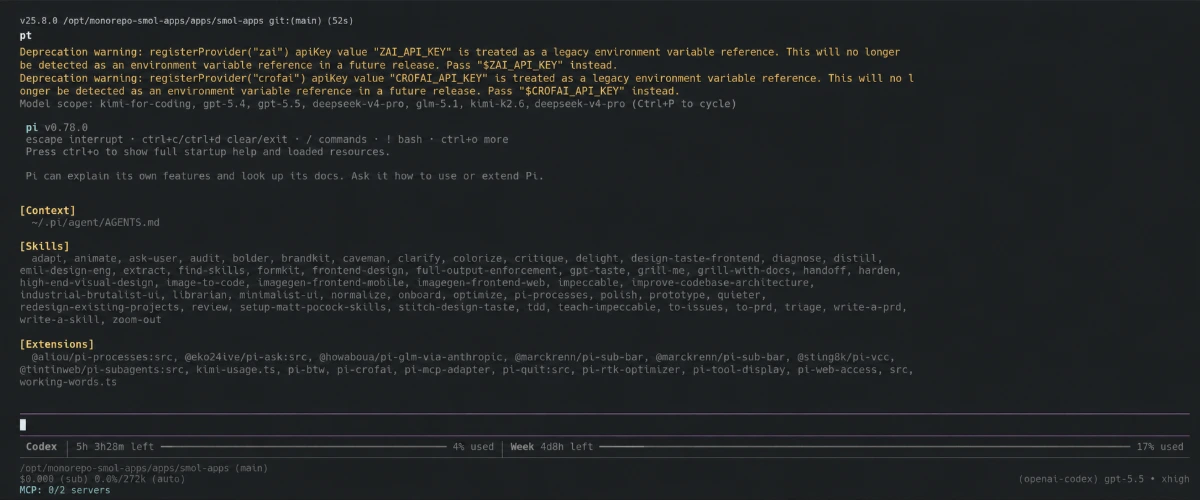
Coding agents are everywhere now.
And I do not only mean the models themselves. I mean the whole layer around them: terminal, tools, file access, Bash, sessions, context, prompts, shortcuts, UI, small safety rules and all the things that turn a chat window into a tool.
That layer is a coding harness.
Not the AI itself, but the harness you put it into. The model thinks and writes. The harness decides which tools it gets, how it reads files, how it runs shell commands, how context is loaded, how sessions are saved and how I, as the human, can interrupt in between.
And that is where it gets interesting.
Because there are many coding harnesses.
But Pi is currently the one that feels most like my own.
Why Pi feels different
Pi describes itself as a “minimal terminal coding harness”.
At first, that sounds like understatement.
In practice, it is pretty much exactly the point.
Pi does not come with the attitude: “Here is your new workflow, please get used to it.” It feels more like: “Here is a slim core, build the rest the way you need it.”
By default, the model gets only a few tools. At the core, those are read, write, edit and bash. Additional built-in read-only tools like grep, find and ls can be added, but the basic idea stays the same: not an overloaded agent spaceship, but a terminal harness with clear edges.
I like that a lot.
Not because fewer features are automatically better. But because less hard-coded opinion often means I have to fight the tool less.
Barebones does not mean weak
Pi deliberately leaves out things other tools build in directly.
No built-in plan mode.
No built-in subagents.
No built-in todo lists.
No permission popups as a basic assumption.
No MCP as a mandatory layer.
Depending on your expectations, that can sound almost cheeky.
But I understand the approach: Pi does not want to decide how I should have those things. If I want plan mode, I can build or install it as an extension. If I want subagents, I can solve that through extensions, tmux or a package. If I need permission gates, I build them for my setup instead of clicking through generic popups.
That is not more comfortable for everyone.
But for me, it is exactly right.
I like tools that have a good basic shape and then get out of my way.
The really good part: everything is pluggable
The most important point about Pi is not that it is minimal.
The most important point is that minimal is not the end.
Pi can be extended through TypeScript extensions. And this is not a small “you can change the color” plugin system. Extensions can register custom tools, add slash commands, intercept events, block or modify tool calls, add custom UI components, change the footer, register custom providers, customize compaction or even retrofit things like subagents and plan mode.
On top of that, there are skills, prompt templates, themes and Pi packages.
Skills are for reusable workflows. Prompt templates are small callable prompt building blocks. Themes change the terminal feel. Packages bundle all that stuff and make it shareable.
That is the point where Pi stops being only a tool for me.
It becomes more like a workbench for coding agents.
What I actually use
$ pi list

User packages:
  npm:@howaboua/pi-glm-via-anthropic
  npm:@sting8k/pi-vcc
  https://github.com/leandr0ck/pi-find-skills
  npm:@aliou/pi-processes
  npm:pi-mcp-adapter
  npm:pi-web-access
  npm:@tintinweb/pi-subagents
  npm:@marckrenn/pi-sub-bar
  npm:pi-quit
  https://github.com/patriceckhart/pi-btw
  npm:pi-rtk-optimizer
  npm:pi-tool-display
  npm:@marckrenn/pi-sub-core
  https://github.com/muffe/pi-kimi-usage
  npm:@eko24ive/pi-ask
  /opt/pi-ext-sync
  npm:pi-crofai
At first glance, that obviously looks like quite a lot.
But if you consider how bare Pi is when naked, this handful of extensions gets the harness exactly to the point where I want it.
Not less, not more.
And thanks to the good documentation, the self-made extensions mostly happened because I wrote a prompt along the lines of
Build me an extension for yourself that does xyz.
Not less, not more.
The short system prompt is not an accident
One detail I especially like about Pi: the default system prompt is surprisingly short.
At its core, it says: you are a coding assistant inside Pi, you can read files, run commands, edit code and write new files. Then it lists the available tools, a few guidelines like “be concise” and “show file paths clearly”, plus project context, skills and relevant Pi docs when the topic is Pi itself.
That is almost it.
Of course the prompt grows dynamically when project rules, skills or extensions are added. But Pi does not start with a novel about how the agent is supposed to think.
I think that matters.
Many agent problems do not only come from the model, but from too much harness opinion in the prompt. Too many rules, too many rituals, too many implicit product decisions. Pi feels lighter there.
Not dumber.
Lighter.
What I like in daily use
- It runs in the terminal. Exactly where my projects already are.
- It stores sessions cleanly. Including branching, forking and tree navigation when you want to jump back.
- It supports many providers. Subscription logins and API-key providers are not locked to a single vendor.
- It is open to custom models and providers. Local models, proxies or custom APIs are not immediately special cases.
- It can run interactively, as print/JSON, over RPC and through an SDK. That makes Pi not only an app, but a layer you can also embed.
- It feels honest. When something is not built in, it is usually a deliberate decision, not a forgotten feature.
Especially together with small tools like RTK, it gives me a very pleasant agent environment: less noise, less product magic, more control.
I deliberately moved the model question into its own article: My LLMs for Pi. The model question quickly becomes its own little zoo.
What Pi does not do for you
Pi is not a softly padded agent amusement park.
If you want a tool that makes every decision for you, bakes in best practices everywhere, cushions every dangerous command with popups and ships a full project-management philosophy, Pi may not be the most comfortable starting point.
Pi trusts you more.
That is nice if you know what you want.
And dangerous if you were actually looking for a guardrail.
That is why I would not recommend Pi to everyone as their first agent tool. But I would recommend it very quickly to people who, after two weeks with other tools, think: “Can I not just have this differently?”
Would I recommend Pi?
Yes.
For me, Pi is currently the coding harness that best fits the way I work.
Not because it has everything built in.
Because it deliberately does not build everything in.
It gives me terminal, model, tools, context, sessions and a very open extension layer. I get to decide the rest.
And that is exactly why Pi is good stuff for me.
It does not try to become my agent workflow.
It lets me build my own.
✦Pi is strong for me because it does not try to become my entire workflow. It gives me a good frame and lets me shape the rest myself.
More good stuff
 Daily Driver
Quooker Cube: expensive, unnecessary, and worth it every single day
My experience living with the Quooker Cube: instant boiling water for tea, chilled sparkling water on tap and whether the steep price is actually worth it.
An absurdly expensive tap that never feels spectacular, and is worth it every single day for exactly that reason. Daily Driver
Gmail to Calendar: The Only Email Automation I Actually Wanted
My experience with a small AI automation that detects appointments in Gmail, summarizes them, and asks before anything lands in the family calendar.
Not AI taking over my email. Just AI saying: this looks like an appointment. Daily Driver
Vercel: my favorite host for TypeScript projects
Why Vercel is the most pleasant host for TypeScript web projects, Nuxt, Next and fast deployments for me, both privately and at work.
Vercel is the host where I can focus on my project instead of all the surrounding infrastructure.